Chapter 21 · Part 3
Credit Reminder
Never get caught short mid-campaign. Set a balance threshold and iSMS will email you when your credit drops below it — giving you time to top up before sending stops. You can also turn on an optional SMS Usage Spike Alert that emails you when a single day’s SMS usage is unusually high.
Setting up the reminder
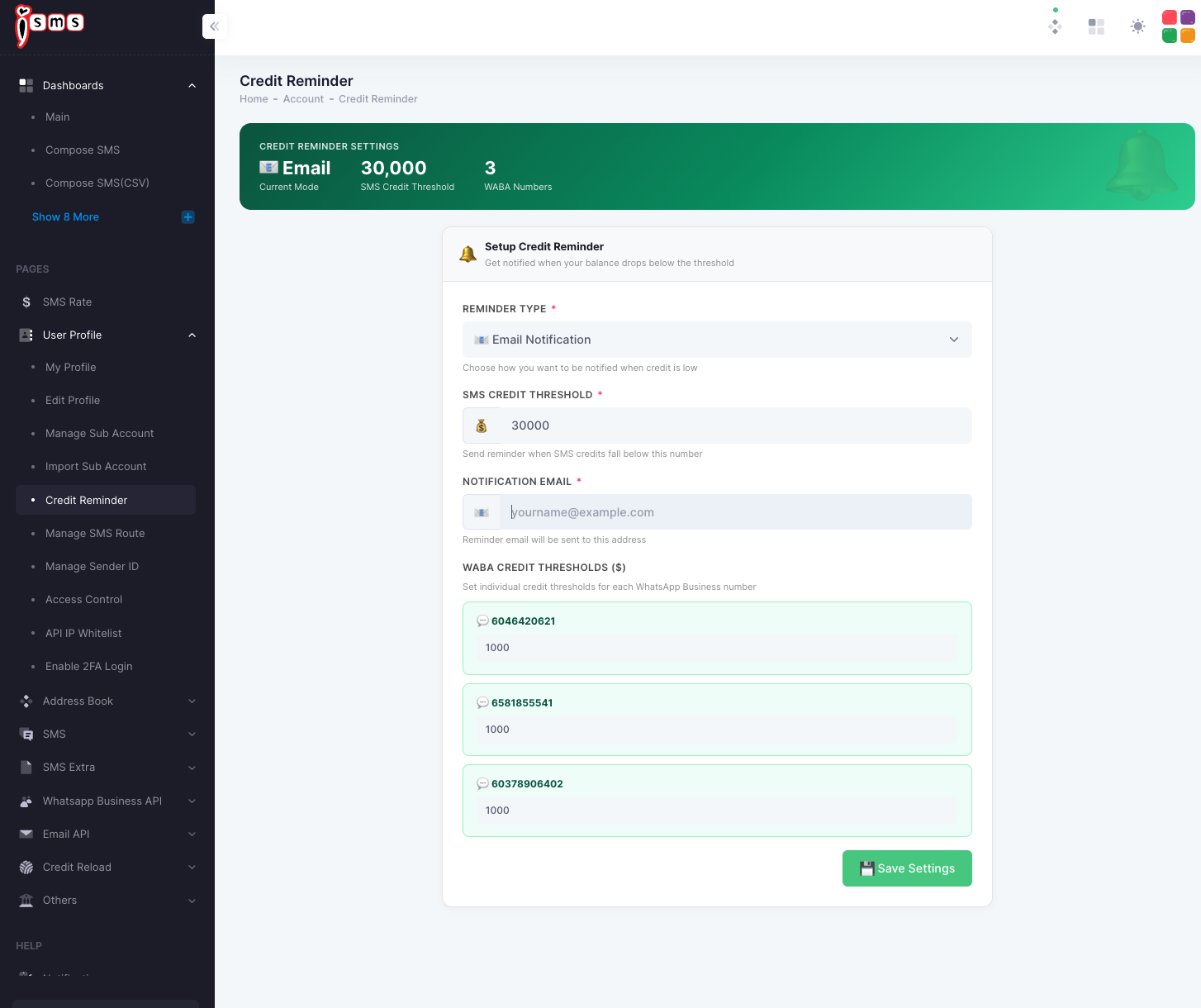
Go to User Profile → Credit Reminder. The summary at the top shows your current mode, SMS threshold, and how many WhatsApp numbers are covered.
- 1
Reminder Type
Choose how you want to be alerted — Email Notification.
- 2
SMS Credit Threshold
Enter the number of credits at which to warn you (e.g. 30,000). When your balance falls below it, the reminder is sent.
- 3
Notification Email
Enter the email address the reminder should go to.
- 4
WABA credit thresholds
If you use WhatsApp Business API, set a separate threshold for each WhatsApp number so you’re warned per number too.
- 5
Save
Click Save Settings to activate the reminder.
When you get reminded
Balance falls
As you keep sending
Hits threshold
Drops below your number
Email sent
To your notification address
Top up in time
Reload before it runs out
SMS Usage Spike Alert
The low-credit reminder above tells you when your balance is running out. The SMS Usage Spike Alert is different: it emails you when your account uses an unusually high number of SMS credits in a single day — for example a script stuck in a loop, a duplicated campaign, or an integration sending more than you expected. It is optional, covers SMS credits only, and is a notification only — it never stops or delays your messages.
| Low Credit Reminder | SMS Usage Spike Alert | |
|---|---|---|
| What it watches | Your remaining balance | SMS credits used today |
| When it emails you | Balance falls below your threshold | Today’s usage reaches your daily threshold |
| How often it checks | Periodically | Once every hour |
| Covers WhatsApp (WABA) | Yes — per-number thresholds | No — SMS only |
| Stops sending | No | No |
Swipe sideways to see all columns →
Turning on the spike alert
On the same User Profile → Credit Reminder page, scroll to the SMS Usage Spike Alert card.
- 1
Check your usage figures
The card shows your average per day (last 30 days), your busiest day, yesterday’s usage, and the automatic threshold the system would use for you. Use these to decide what is “unusual” for your account.
- 2
Enable usage spike alert
Switch the toggle on.
- 3
Daily credit threshold
Leave it blank for the automatic threshold (recommended), or enter a fixed number of SMS credits per day. Click Use automatic at any time to go back to automatic.
- 4
Read and accept the conditions
Read the Important box and tick “I have read and agree”. The alert cannot be enabled without this. The conditions are the same as those listed below.
- 5
Save
Click Save Settings. Alerts go to the Notification Email on the same page — keep it up to date.
How the spike alert works
You send SMS
Portal, API or scheduler
Hourly check
SMS credits used since midnight
Compare
Against your daily threshold
Email alert
Once per day, when reached
You review
Planned? Fine. Not? Stop the source
The count restarts from zero at midnight (Malaysia time, GMT+8) every day.
How the automatic threshold is calculated
Automatic threshold · four steps
- 1
Last 30 days
Total SMS credits you used
- 2
Average per day
Total ÷ 30, including days you sent nothing
- 3
× 3
Three times your normal day
- 4
Minimum 500
New accounts with no history: 2,000
| Your average per day | × 3 | Automatic threshold |
|---|---|---|
| 800 credits | 2,400 | 2,400 credits per day |
| 120 credits | 360 | 500 — the minimum applies |
| No usage history yet | — | 2,000 credits per day |
If you enter your own number, that number is used instead and the automatic calculation is ignored.
Example: one day with a spike
An account averaging 800 credits a day has an automatic threshold of 2,400. At about 10am a script starts re-sending the same batch.
SMS credits used since midnight · checked every hour
The alert is sent at the first hourly check after today’s usage reaches the threshold. Messages sent between checks are charged as normal.
| Hourly check | Used in the last hour | Used since midnight | Result |
|---|---|---|---|
| 08:07 | 240 | 420 | Below 2,400 — no email |
| 09:07 | 230 | 650 | Below 2,400 — no email |
| 10:07 | 2,000 | 2,650 | Threshold reached — alert email sent |
| 11:07 | 3,000 | 5,650 | Already alerted today — no repeat |
| Next day 00:07 | — | Restarts from 0 | Can alert again if reached |
Swipe sideways to see all columns →
Conditions of use
By enabling the SMS Usage Spike Alert you agree to the following. Your acceptance is recorded with the date, time and IP address when you save.
Please read before enabling
- Courtesy notification only. The alert is provided free of charge, on a best-effort basis. It is not a usage limit, spending cap, fraud-detection or security service, and it does not stop, block, delay or limit any message.
- SMS credits only. Only your SMS credit balance is monitored. WhatsApp (WABA) credits and any other services are not covered.
- Hourly checks. Usage is checked approximately once an hour and counted from 00:00 (Malaysia time, GMT+8). A sudden or fast spike can be fully sent and charged before any alert is generated. On the day you first enable the alert, only usage after you enable it is counted.
- No guarantee of delivery. Alerts may be delayed, not generated or not delivered — for example because of email filtering or spam folders, an incorrect or out-of-date notification email, system maintenance, network or service outages, third-party email delivery, or a threshold that does not suit your traffic.
- Figures are indicative. Usage shown in the alert is calculated from changes in your SMS credit balance and may differ from your reports (for example because of adjustments, refunds or top-ups during the day). Your account reports and billing records are the authoritative record of usage.
- Your responsibility. You remain solely responsible for monitoring your own account and usage, keeping your login and API credentials and whitelisted IP addresses secure, the behaviour of your own systems and integrations, and keeping your notification email up to date.
- All usage is chargeable. All messages submitted from your account or from your authorised IP addresses are charged. Charges will not be waived, reversed, credited or refunded on the grounds that an alert was late, not generated, not received, not enabled, or that the threshold was set too high or too low.
- Changes. We may change, suspend or discontinue this feature, including how thresholds are calculated and how often usage is checked, at any time.
- Terms of service. These conditions are in addition to the iSMS User Agreement. If there is any conflict, the User Agreement prevails.